
Comparison
Bulk SEO URL Manager vs Redirection
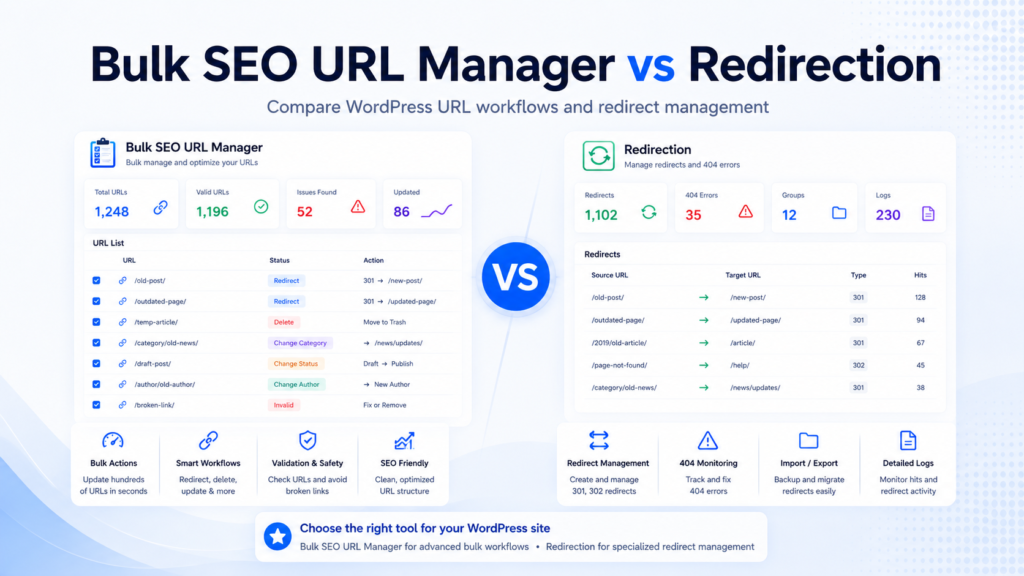
Bulk SEO URL Manager and Redirection can both be useful on WordPress sites, but they are built for different workflows. Redirection is a strong, popular redirect-focused plugin. Bulk SEO URL Manager is focused on broader URL operations using pasted URL lists.
This comparison is designed to help users choose the right workflow without claiming that one tool is always better.
Quick summary
Redirection is best when the main need is dedicated redirect management and 404 tracking. Bulk SEO URL Manager is best when the workflow starts with a list of URLs and requires different actions such as delete, redirect, categorize, status change, export, and Pro workflows.
| Tool | Best For | Main Strength |
|---|---|---|
| Redirection | Managing redirects and 404s | Dedicated redirect management |
| Bulk SEO URL Manager | Bulk URL operations by pasted URL lists | Delete, redirect, categorize, status change, export, and Pro workflows |
What Redirection does well
Redirection is mature and focused on redirect management. It is useful for redirect rules, 404 tracking, and dedicated redirect workflows. Sites that mainly need redirect management may prefer that focused approach.
What Bulk SEO URL Manager does differently
Bulk SEO URL Manager works from pasted URL lists and supports processing WordPress content by URL. It can delete posts by URL, change categories, change status, redirect URLs, export URL indexes, and add Pro workflows such as noindex, author changes, CSV import, Find & Replace, Redirect Manager, and logs.
Feature comparison
Use this table as a practical workflow comparison, not as a claim that one plugin should replace the other on every site.
| Feature | Redirection | Bulk SEO URL Manager |
|---|---|---|
| Redirect management | Yes | Yes |
| 301 redirects | Yes | Yes |
| 404 tracking | Yes | No |
| Delete posts by URL | No | Yes |
| Change category by URL | No | Yes |
| Change post status by URL | No | Yes |
| Set noindex by URL | No | Pro |
| Export URL index | No | Yes |
| Paste-and-go URL workflow | Depends | Yes |
| CSV import | Depends | Pro |
| Action logs | Yes | Pro |
Which tool should you choose?
Choose Redirection if you mainly need redirect management, 404 monitoring, and a dedicated redirect plugin. Choose Bulk SEO URL Manager if you need to perform different actions from URL lists, manage large content libraries, and combine cleanup, redirects, categories, status changes, and exports in one workflow.

Can you use both?
Yes. Some sites may use Redirection for dedicated redirect management and Bulk SEO URL Manager for bulk URL operations. The right setup depends on how the site owner manages redirects and content cleanup.
Frequently asked questions
Is Bulk SEO URL Manager a Redirection alternative?
It can handle redirect workflows, but it is broader than a redirect-only tool and is not always a replacement.
Can Bulk SEO URL Manager create redirects?
Yes. It supports redirect workflows from URL lists.
Can I use Redirection and Bulk SEO URL Manager together?
Yes. Some sites may use both for different workflow needs.
Which plugin is better for 404 monitoring?
Redirection is the better fit when 404 monitoring is the main need.
Which plugin is better for bulk content cleanup?
Bulk SEO URL Manager is built for URL-based content cleanup workflows.
Need more than redirects?
Use Bulk SEO URL Manager to turn reviewed URL lists into safer WordPress URL operations with validation, previews, exports, and Pro workflows when you need them.